Halloween AI photo generator
AI Halloween Costume Generator: Try On a Costume From Your Photo
Not sure what to wear? Upload one photo and see yourself in a witch, a vampire, a robot or a sugar-skull queen before you buy a single prop. The AI keeps your face and builds the costume around it.
Halloween AI1 selfie3:4 PNG1 credit per image
Halloween AI · Look 04
Real result · AI person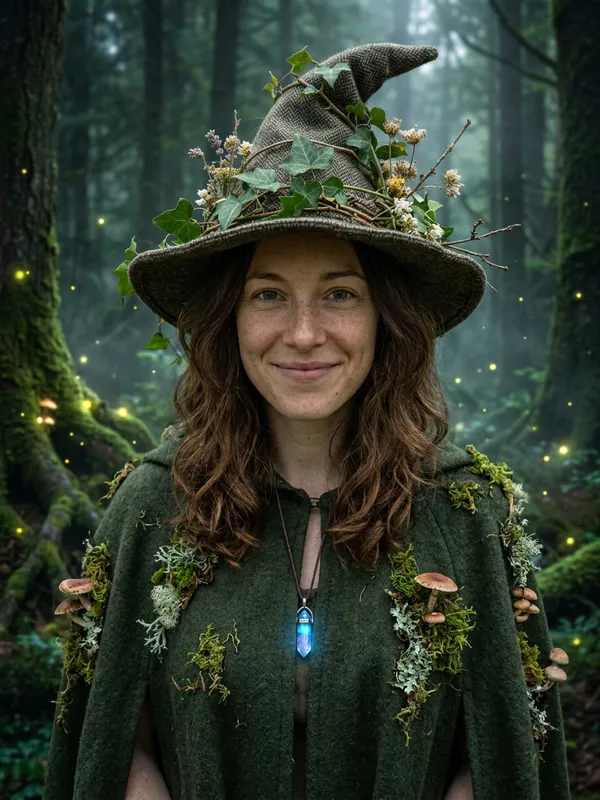
01 · Create your look
Put yourself in a Halloween AI look
Upload one clear photo of yourself (18+), or of your own pet. Couple looks also take one photo of a second adult who appears with you and has agreed. A sharp, evenly lit, front-facing photo keeps your face the most stable.
Selected lookForest Witch
01
Upload your photoJPG, PNG or WebP · max 8 MB
The AI keeps your face recognizable and changes hair, outfit, makeup and scene. Hands, small accessories and your look can vary, so review the portrait before you share it. If the photo cannot be used, the credit is returned.
We keep your photo only while the image is made and delete it when the image is ready or the job fails. Your portrait stays downloadable for 14 days; deleting it or your account removes it sooner. The photo is sent to Google’s Nano Banana 2 image model through our AI provider, only to make your image. Privacy policy
02
Cost1 credit · 3:4 PNG
Your balance—
This image1 credit
Failed or blocked generations return the credit.
02 · Pick a look
Halloween AI looks
Open a look to see the result, or choose Make this look to jump straight to the generator.
If you want an AI Halloween costume generator that works from your own face, this page covers the try-on step. You upload one photo, pick one of 13 original looks, and get back a 3:4 portrait of you wearing that costume. Treat the result as a mood board, not a finished plan.
An ai halloween costume generator is most useful for one question that a product photo cannot answer: does this look suit me? Our tool at HalloweenAI.fun answers it with your own features, so you can check colors, hats, makeup and accessories before you spend money or hours on a real costume. The sections below explain how the generator works, which look fits which night out, how to compare a render with your original, and where the AI still gets things wrong.
How an AI Halloween costume generator tries a look on your photo
Each look in this ai halloween costume generator is built from a prompt with three parts. The first part tells the image model to use your photo as the main reference and keep your facial identity, proportions, skin tone and approximate age. The second part describes the costume, such as a velvet coat or a set of violet braids. The third part lists what to avoid: altered faces, extra limbs, duplicated fingers, distorted anatomy, text, logos and watermarks. The image model is Google Nano Banana 2. For the technical background on Google's image models, read the Gemini API image generation docs.
Every look renders one 1K image in 3:4 portrait format. Your uploaded photo is deleted as soon as the image is finished or the generation fails. A finished PNG can be downloaded for 14 days, and deleting the image or your account removes it sooner. Up to two generations can run at the same time.
Each image from the ai halloween costume generator costs one credit. A couple look uses two photos but still costs one credit. If a generation fails or is blocked by the safety review, the credit goes back to your balance. That is a credit return, not a cash refund. Credit packs are a one-time payment with no subscription, and the credits never expire. The current packs are on the pricing page.
The table below is the short version of how to use the tool.
| Step | What to do | Tip |
|---|---|---|
| 1. Sign in | Sign in with a Google account and add credits if you need them | Trick gives 5 credits for $4.99 |
| 2. Upload | Add one clear, front-facing photo of yourself (18+) or your own pet | Avoid group photos, minors, public figures and anyone who has not agreed |
| 3. Pick a look | Choose one of the 13 looks, or two photos for Cowboy and Angel | Match the look to your situation using the table below |
| 4. Generate | Wait for the 3:4 PNG, which usually takes 30 to 60 seconds | Check the first render before you spend credits on a retry |
| 5. Compare | Put the render next to your original | Use the checklist later on this page |
Pick the look that fits your situation
Not every look works in every room. When you use an ai halloween costume generator for a specific event, start with the event and then pick the look. The table below pairs common situations with the look that suited that mood best in our test renders. These are suggestions based on how each render looked to us, not promises about how your photo will turn out. If you want idea-first browsing before you try anything on, the halloween costume generator page is built for that.
| Situation | Look to try first | What to check in the render |
|---|---|---|
| Costume party | Velvet Vampire | Whether the high collar and red lining read clearly; no fangs are shown |
| Photo for social media | Sugar Skull Glam | Whether the skull makeup still follows your face and your eyes stay clear |
| Work event | Cosmic Princess | Whether the star embroidery is subtle enough to wear to the office |
| Themed dinner | Midnight Braids | Whether the braids and the candlelit garden suit the table setting |
| Group chat reveal | Haunted Unicorn Mascot | Whether the hood and face read clearly enough to get a laugh |
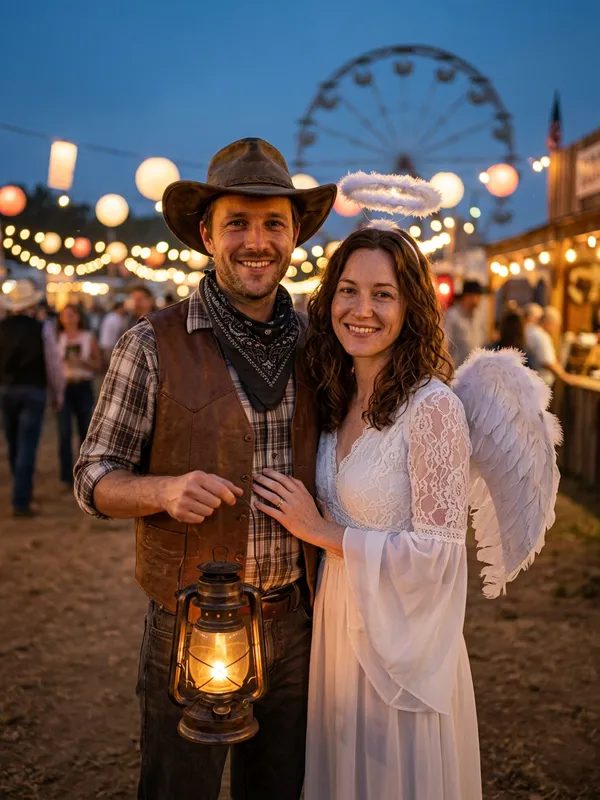
Pets have their own pair of looks in the ai halloween costume generator. Pumpkin Pet dresses a dog in a soft pumpkin costume with green leaves in a cozy autumn studio, and the eyes stay uncovered. Glow Dino Pet puts a glowing green dinosaur suit on the dog in a dim room with string lights, and its hood leaves the whole face visible. Both were tested with a golden retriever. For two people, Cowboy and Angel is the only couple look, and it keeps both faces recognizable. If you are looking for pet or couple ideas specifically, see the ai pet halloween costume page or the ai couple halloween costume page.
What our test renders showed, and how to compare them
We ran each of the 13 looks through the ai halloween costume generator once. The inputs were one fictional female selfie for most looks, a golden retriever for the two pet looks, and two fictional selfies for the couple look. Every render came out as a 3:4 PNG of about 1.6 to 1.8 MB, and a single image usually finished within 30 to 60 seconds. We checked them by eye, and the people and the dog were still recognizable in all 13. This is a small sample with one run per look, so a different photo can change the result.
A few renders are worth knowing about before you start. The Haunted Unicorn Mascot hood covers the hair, but the whole face stays visible. The Velvet Vampire render keeps the look dramatic without showing fangs. The Backrooms Glow look has a faint green glow on the face, so it is subtle by design. The Halloween Robot look shows metal armor plates, blue LED lights and moving shoulder parts, with your face still in place and the helmet held in one hand.
When you compare a render with your original, keep the photo size and crop the same, then check these three things in order.
| Check | What to compare with your original | If it fails |
|---|---|---|
| Face | Eyes, nose, mouth and face shape should still look like you | Retry with a sharper, front-facing photo |
| Hair | Hairline and length, especially under a hood or a hat | Choose a look without a hood, or accept that the real hair will differ |
| Skin and age | Skin tone and apparent age should stay close to the original | Try another photo with even light |
Use the same photo for every look in a set, so the comparison is fair. Look at the face first, then the hair, then the hands. If the face has drifted, the render is not useful as a mood board, even if the costume itself looks good.
Turn the render into a real costume
Once the ai halloween costume generator gives you a render you like, the render is most useful when you take it apart. Pick two or three elements you like, then check whether they suit your coloring and your style. The table lists what to copy from each look.
| Look | Elements to copy | Easiest part to get right |
|---|---|---|
| Velvet Vampire | Black velvet coat with a high collar, red lining, silver brooch, pale makeup and deep red lip | The brooch and the lip color |
| Forest Witch | Moss-toned cloak, pointed hat wrapped in ivy, crystal pendant | The pendant and the hat |
| Midnight Braids | Long violet braids, silver hair accessories, black and purple velvet dress | The braid color and the accessories |
| Sugar Skull Glam | Skull makeup that follows the bones of the face, deep red rose crown, black lace top | The lace top and the crown |
| Cosmic Princess | Midnight blue dress with star embroidery, silver moon crown | The crown and the dress |
Buy or make one hero piece and borrow the rest from what you already own. A brooch, a crown or a lip color can carry most of the look. Test the makeup a day ahead, and wear the full costume for a short walk before the party, so you find out what sits badly while you can still change it. A tall hat wrapped in ivy can be hard to keep on all night, so check its balance before you commit to it.
Where the AI still gets it wrong
No ai halloween costume generator gets everything right, and this one is no exception. Hands are the most common failure point. Fingers can be duplicated or bent at odd angles, and a hand holding a prop is harder to get right than a face. Small accessories such as rings, buckles, tiny buttons or thin chains can blur, go missing, or change from one render to the next. Hoods and hats cover hair, so a render may not show how your real hairline sits under the costume. The glow in Backrooms Glow is deliberately faint, so do not expect a strong light effect.
Fabric is another gap. A render shows how velvet or lace might look under light, not how it will hang on your body or move when you sit down. Treat the render as a direction, then check the real fabric in person.
If a render has a hand problem, do not try to hide it by cropping in. Each retry costs one credit, so look at the first render carefully before you run another. Start with a clear, front-facing photo of yourself or your own pet, lit evenly, with no other people in the frame. Public figures, celebrities, minors and anyone who has not agreed are never allowed. This tool is a planning aid, and your own eyes and a test fitting still decide what you wear.
AI Halloween costume generator FAQ
AI Halloween costume generator questions
01How does the AI Halloween costume generator work?+
You upload one clear photo and pick a costume look. The AI keeps your face, skin tone and approximate age and redraws your outfit, makeup and background to match the look.
02Can I use this to plan a real costume?+
Yes. Many people use the portrait as a mood board: it shows which colors, hats and makeup suit them before they buy or sew anything.
03Does it make costumes of specific movie characters?+
No. Every look is an original style. We do not generate named film, game or comic characters or their logos.
Halloween AI generator