Halloween AI photo generator
Halloween Costume Generator: Get an Idea, Then See It on You
Stuck for an idea? Press the button for a random costume, then upload one photo and see it on you. Ideas are free to browse; a portrait costs one credit.
Halloween AI1 selfie3:4 PNG1 credit per image
Halloween AI · Look 05
Real result · AI person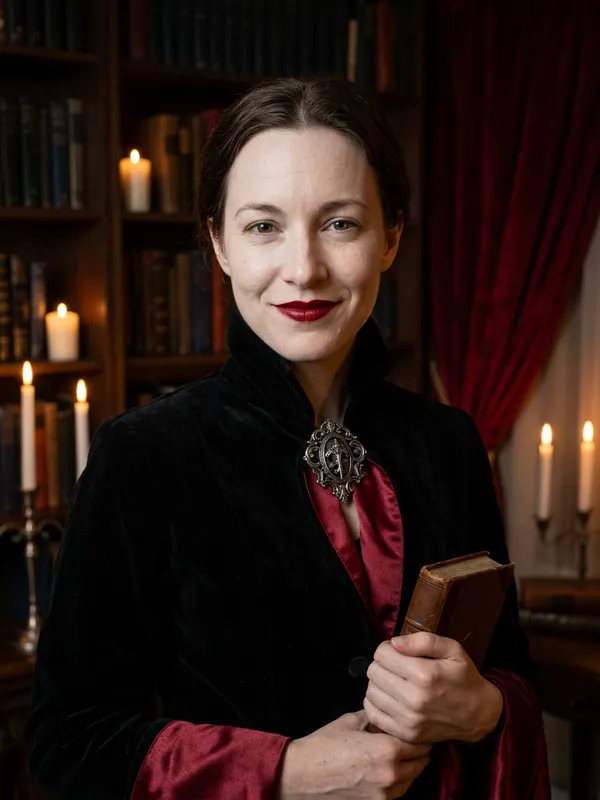
01 · Create your look
Put yourself in a Halloween AI look
Upload one clear photo of yourself (18+), or of your own pet. Couple looks also take one photo of a second adult who appears with you and has agreed. A sharp, evenly lit, front-facing photo keeps your face the most stable.
Selected lookVelvet Vampire
01
Upload your photoJPG, PNG or WebP · max 8 MB
The AI keeps your face recognizable and changes hair, outfit, makeup and scene. Hands, small accessories and your look can vary, so review the portrait before you share it. If the photo cannot be used, the credit is returned.
We keep your photo only while the image is made and delete it when the image is ready or the job fails. Your portrait stays downloadable for 14 days; deleting it or your account removes it sooner. The photo is sent to Google’s Nano Banana 2 image model through our AI provider, only to make your image. Privacy policy
02
Cost1 credit · 3:4 PNG
Your balance—
This image1 credit
Failed or blocked generations return the credit.
02 · Pick a look
Halloween AI looks
Open a look to see the result, or choose Make this look to jump straight to the generator.
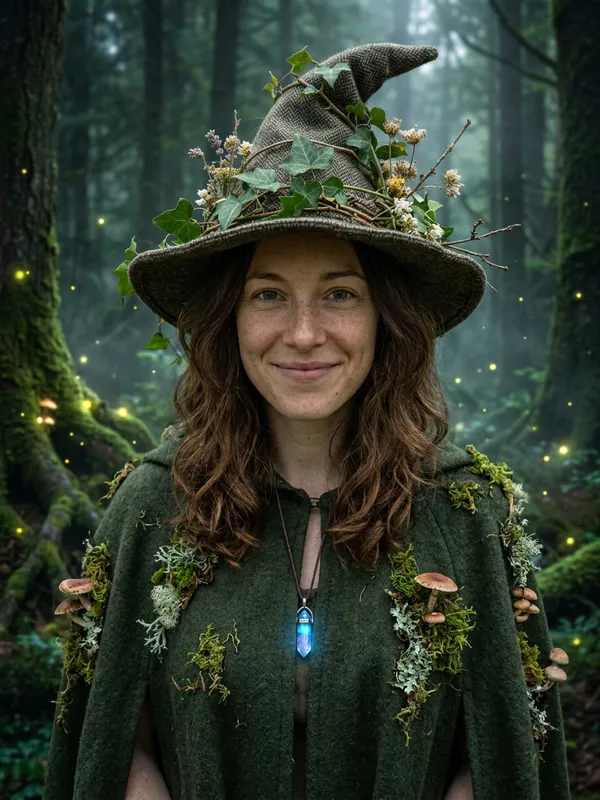
This halloween costume generator works in two steps, and you can stop after the first one. Step one gives you a costume idea: press "Give me a costume idea" and the page picks one of our single-photo looks at random. Step two is the try-on, where you upload one photo of yourself or your pet and get a portrait of that subject in the costume. If you are still deciding, a halloween costume generator is most useful when it shows you options before it asks for a photo. Browse first, and spend a credit only on a look that is worth seeing on you.
How the halloween costume generator works in two steps
The idea button is the quickest way into the tool. It does not ask for a photo and it does not make an image, so it costs no credits. Each press shows one of the 12 single-photo looks. The couple look is not in that random pool, because it needs two people. You choose it from the grid directly.
Once a look catches your eye, move to the try-on. This is the step where your own face goes into the costume. The result is a render, not a fitting, so read it as a preview of the idea rather than a finished plan.
Choose a look by mood
There are 13 looks in total, and this halloween costume generator draws on all of them. We group them by mood below so you can start from how you want to feel at the party, not from a list of names. The groups are our own labels, not a ranking.
| Mood | Looks | What to expect |
|---|---|---|
| Spooky | Sugar Skull Glam, Y2K Horror Night, Backrooms Glow | Bold face makeup, dark or eerie settings. The Backrooms glow is subtle. |
| Elegant | Midnight Braids, Velvet Vampire, Cosmic Princess | Velvet, lace, moonlit gardens and candlelit rooms. The vampire look shows no fangs. |
| Funny | Haunted Unicorn Mascot, Cowboy and Angel | A worn mascot suit with a cracked horn. The couple pair is the only two-person look. |
| Sci-fi | Halloween Robot, Galactic Hero | Metal armor pieces, blue LEDs, a goggles-on-forehead hero with a short metal cape. |
| Cute pet | Pumpkin Pet, Glow Dino Pet | Soft pumpkin outfit or a glowing dinosaur suit, shot in a warm or dim room. |
If you want a halloween costume ideas from your photo session, choose one mood first, then press the idea button until a look from that row appears. Pick the row that matches your party, not the one with the most drama.
Quick idea or full try-on
A quick idea is the lightest way to use a halloween costume generator. Use it when you are browsing themes for a group or a mood board. Use a full try-on when you have a short list of two or three looks and want to see how each one works on your face, your hair or your pet. A quick idea needs no photo and no credit. A full try-on is where your credits go.
| Your situation | Use | Why |
|---|---|---|
| Browsing themes for a group | Quick idea | No photo and no credit, so you can move on fast |
| Choosing between two or three looks | Full try-on on each | You compare the portraits side by side with your original |
| Planning a pet costume | Full try-on with a pet photo | Check that the eyes and face stay visible |
| Planning a costume for two | Full try-on with two photos | Both faces need to stay recognizable |
A practical rule: spend credits only on looks you would really wear. Trying all 13 looks once costs 13 credits. Trying three costs three.
How the try-on works, step by step
The try-on is the part of the halloween costume generator that uses your photo. Here is the full path.
- Sign in with your Google account.
- Upload one clear photo of yourself (18+) or of your own pet. A couple look also takes one photo of a second adult who appears in the portrait with you and has agreed to it.
- Pick a look, either from the idea button or from the grid.
- Wait for the result. A single portrait usually finishes in 30 to 60 seconds, and up to two generations can run at the same time.
- Download the 3:4 PNG. Finished images stay available for download for 14 days.
Your uploaded photo is deleted as soon as the image is finished or has failed. If you delete an image or your account, the result is removed earlier than the 14 days.
The images are made with Google's Nano Banana 2 image model. Each look has a written instruction with three parts: keep the subject's facial identity and natural anatomy, describe the costume and setting, and list what to avoid, such as altered faces, extra limbs, duplicated fingers, text, logos and watermarks. If you want to read about the image generation side of the model, the Gemini API image generation docs are the place to start.
The rules are simple. Upload a photo of yourself (18+) or of your own pet. Couple looks also take one photo of a second adult who appears in the portrait with you and has agreed to it. You must be one of the two people. Public figures, celebrities, minors and anyone who has not agreed are never allowed, including parody and fan edits. Impersonation, harassment, fraud and copyrighted characters are not allowed. Every look is an original style. The tool does not make named film, game or comic characters, and it does not use their logos.
What one portrait costs
One credit makes one image. Each portrait from this halloween costume generator costs one credit. A couple look uses two photos but still costs one credit. Browsing the ideas costs nothing, because no image is made.
| Action | Credits | Notes |
|---|---|---|
| Press the idea button or browse the grid | 0 | No image is made |
| One portrait, one photo or a couple pair | 1 | A couple look still costs 1 |
| A failed or blocked generation | 1 returned | Returned as a credit, not as cash |
| Pack | Credits | Price |
|---|---|---|
| Trick | 5 | $4.99 |
| Treat | 15 | $9.99 |
| Coven | 40 | $19.99 |
Packs are one-time payments with no subscription, handled by Dodo Payments and Waffo Pancake, and credits do not expire. Per credit, the Trick pack works out to $1.00, the Treat pack to about $0.67 and the Coven pack to $0.50. You can see the full details on the pricing page.
Where the try-on can go wrong
Before writing this page we ran a small test. We made each of the 13 looks once, using an AI-generated fictional woman's selfie, a golden retriever photo, and a fictional selfie pair for the couple look. By eye, the person and the dog were still recognizable in all 13 renders. That is a small sample of one image per look, and your results will change with your photo, lighting and pose.
The weak spots are the ones you would expect from AI images. Use this table as a checklist when a portrait comes back.
| What to check | Where it goes wrong | What to do |
|---|---|---|
| Hands and fingers | Extra or merged fingers, hands holding props | Do not plan a costume around the hands; a new try costs one credit |
| Hair under hoods and hats | Hoods and hats can hide hair in the render | Compare the hairline with your original |
| Small accessories | Rings, buckles and props can change shape | Treat them as a sketch, not a spec |
| Backrooms Glow | The green glow on the face is faint | Expect a subtle effect, not a strong one |
Treat this halloween costume generator as a sketchbook, not a fitting room. Compare each portrait with your original, side by side. If the eyes, nose, skin tone or apparent age look different, the render has drifted from you. A different photo with even light and a plain background is the next thing to try.
Some limits to keep in mind about this halloween costume generator. The tool makes still images only, and there is no video option yet. Each credit gives you one 3:4 PNG at 1K resolution. The looks are original styles, so do not expect a result to match a specific film or game costume.
For more ideas by pet or by pair, see pet Halloween costumes and couple Halloween costumes. If you want the wording behind each look, the halloween AI prompts page lists them.
Halloween costume generator FAQ
Halloween costume generator questions
01What is a Halloween costume generator?+
It is a tool that suggests a costume idea. This one goes one step further: after you get an idea, you can upload a photo and see the costume on yourself.
02Are the ideas random?+
The idea button picks one of our original looks at random. Press it again for another.
03Do I need to upload a photo to get an idea?+
No. Browsing ideas is free. You only need a photo and a credit when you want to see the costume on you.
Halloween AI generator