Halloween AI photo generator
Halloween Photo Editor: Add Spooky Makeup and Backgrounds
Start from your own photo and make it Halloween: sugar-skull makeup, a moonlit garden, candlelight or a full costume. The AI edits the photo for you, no layers or brushes.
Halloween AI1 selfie3:4 PNG1 credit per image
Halloween AI · Look 02
Real result · AI person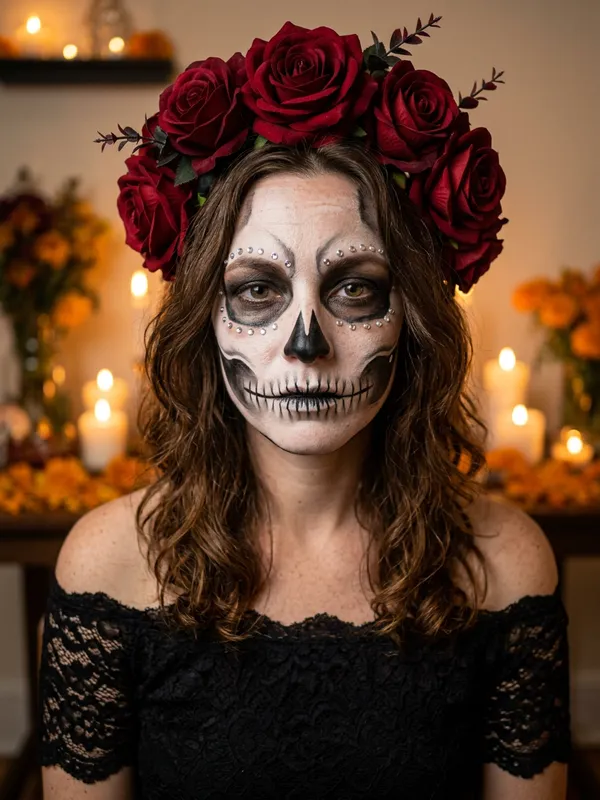
01 · Create your look
Put yourself in a Halloween AI look
Upload one clear photo of yourself (18+), or of your own pet. Couple looks also take one photo of a second adult who appears with you and has agreed. A sharp, evenly lit, front-facing photo keeps your face the most stable.
Selected lookSugar Skull Glam
01
Upload your photoJPG, PNG or WebP · max 8 MB
The AI keeps your face recognizable and changes hair, outfit, makeup and scene. Hands, small accessories and your look can vary, so review the portrait before you share it. If the photo cannot be used, the credit is returned.
We keep your photo only while the image is made and delete it when the image is ready or the job fails. Your portrait stays downloadable for 14 days; deleting it or your account removes it sooner. The photo is sent to Google’s Nano Banana 2 image model through our AI provider, only to make your image. Privacy policy
02
Cost1 credit · 3:4 PNG
Your balance—
This image1 credit
Failed or blocked generations return the credit.
02 · Pick a look
Halloween AI looks
Open a look to see the result, or choose Make this look to jump straight to the generator.
A halloween photo editor takes one photo of you or your pet and redraws it in a Halloween style: a new outfit, new makeup and a new background, while your face stays recognizable. If you searched for a halloween photo editor because you want to see yourself as a witch, a skull-faced glamour portrait or a creature in a candlelit room, this page explains what the tool changes, which look fits which idea, how to pick your source photo, and how to check the result before you post it. You upload one photo, pick a look, and get one new 3:4 PNG back. In our tests, a single render usually finished in 30 to 60 seconds.
How a halloween photo editor differs from a sticker or filter app
A sticker or filter app usually lays something on top of your photo: a hat, a patch of paint or a colour tint. A halloween photo editor works differently. It generates a new image from your photo and the look you pick, so it can change several parts of the picture at once. The image model behind the tool is Google's Nano Banana 2, and the Gemini API image generation docs explain how Google's image models handle an input photo and a text prompt.
People who search for a halloween filter or a halloween ai filter usually want the same result as a halloween photo editor: a Halloween version of their own face. The difference is how it is made. A filter applies an effect to the live camera feed, while our tool makes one still image from a photo you have already taken. It is not a live camera filter, and it does not make video. Each look is written as a prompt that tells the model to keep your facial identity, proportions, skin tone and approximate age, then describes the new outfit, makeup and scene.
Here is what typically changes and what stays:
| Part of your photo | What the editor does |
|---|---|
| Face | Kept recognizable. The prompt asks the model to preserve your facial identity and proportions |
| Outfit | Replaced with the clothing of the look, such as a black velvet gown or a black lace top |
| Makeup | Redrawn, such as skull face paint that follows the bones of the face |
| Background | Replaced with a Halloween scene, such as a candlelit library or a foggy forest |
| Hair | Can be restyled, such as long braids, or covered by a hood or hat |
Creators on TikTok often describe filters that turn a selfie into a witch or a vampire, or that give it a Y2K flash-camera look. Those are quick and fun. A generated image takes a short wait, but it can change the outfit and the scene as well, so it is closer to dressing up a portrait than to adding a sticker.
Which look to pick when you only want makeup or a spooky background
Not everyone wants a full costume change. If you only want spooky makeup, a creepy room or a moody backdrop, four of our looks sit closest to that idea. Start with the change you want, then choose the look.
| What you want to add | Look to try | What you get |
|---|---|---|
| Spooky face makeup | Sugar Skull Glam | Skull face paint that follows the bones of your face, a deep red rose crown, a black lace top, and candles and marigolds behind you |
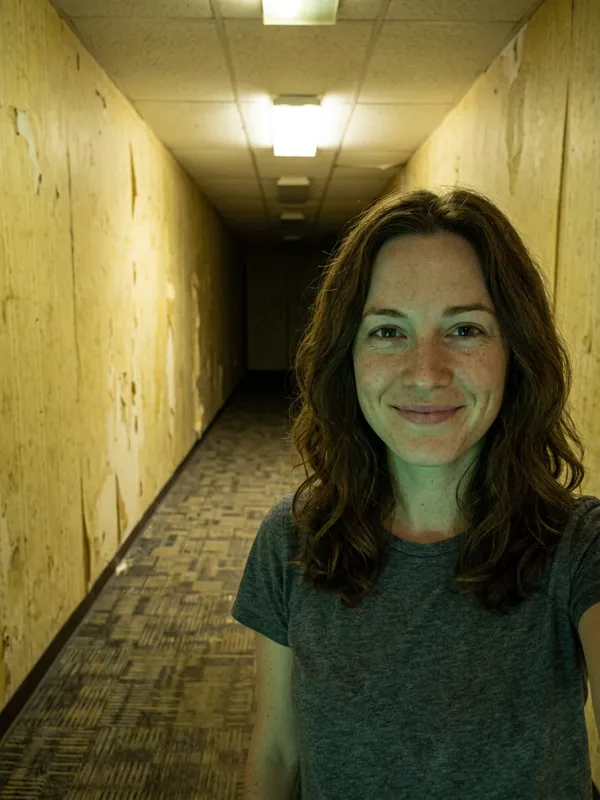
| A creepy background with a faint glow | Backrooms Glow | An endless yellow wallpaper hallway with humming lights and old carpet, plus a soft green glow on the face. The glow is subtle |
| A retro horror bedroom | Y2K Horror Night | A 90s bedroom with posters, a flip phone and a lava lamp, plus an original faceless figure in a black hooded robe standing in the doorway |
| New hair and a moonlit scene | Midnight Braids | Long violet braids with silver accessories, a black and purple velvet outfit, and a moonlit Victorian garden with a lantern |
Two notes help you choose a look in this halloween photo editor. Y2K Horror Night puts a second figure in the frame, so if you want only yourself in the picture, Backrooms Glow is the better fit, since it had no other people in our test render. If you want the makeup change without a new outfit, Sugar Skull Glam is the look that focuses most on the face.
How to choose the source photo
In a halloween photo editor, the source photo does more than any setting to decide the result. Use these rules when you pick one:
- Use one subject. The looks are written for exactly one person or one pet, so crop out other people from the frame.
- Use a photo of yourself (18+) or of your own pet. The service never allows public figures, celebrities, minors, anyone who has not agreed, or photos used to impersonate someone, including parody and fan edits, so do not upload them.
- Show the face clearly. A sharp, evenly lit photo with the face turned toward the camera gives the model the most to work with.
- Keep your hair visible if you want braids. A hood or hat in the look covers the hair, as it does in Haunted Unicorn Mascot, where the hood hides the hair but the whole face stays visible.
- Keep the original photo. You will compare the render against it, and you may want it for a second try.
- For a pet, use a clear photo of the animal's face. For a couple look, upload a photo of yourself and one of a second adult who appears with you and has agreed. Cowboy and Angel is the couples look, and it uses both photos in one render. For details, see the AI pet Halloween costume and AI couple Halloween costume pages.
How to check your edit: face, hands and accessories
Check the render from the halloween photo editor before you save or share it. Open your original and the new image side by side, then go through the list below. Hands, small accessories and props are where AI images most often go wrong, so start there.
| Check | What to look for | If it fails |
|---|---|---|
| Face | The same person or pet, with the same proportions, skin tone and rough age as your original | Try again with a sharper, closer photo of the face. Each new render costs 1 credit |
| Hands | Five fingers on each hand, natural joints, and no finger that merges into a prop | Generate again. Do not post a render with odd hands |
| Accessories | Rings, headpieces, straps and held items are whole and attached where they should be | Generate again, or choose a look with fewer small props |
| Hair | Hair is visible, or a hood or hat covers it on purpose | Pick a look without a hood if your hair needs to show |
| Text and logos | No stray words, logos or watermarks | Generate again |
Small props need extra attention. In our Halloween Robot test render, the person holds a helmet, so check the grip and the fingers around it before you trust the image. Backrooms Glow is the other edge case: its green glow on the face is faint. If you need a strong effect, compare the render with your original and expect the glow to be the least visible change.
What our own test renders showed
We ran all 13 looks through the halloween photo editor once each. The test person was an AI-generated, fictional woman's selfie, the pet was a photo of a golden retriever, and the couples look used two fictional selfies. That made 13 PNG files, each about 1.6 to 1.8 MB, and a single render typically finished in 30 to 60 seconds. By eye, the person or pet stayed recognizable in all 13 renders. This is a small sample, one run per look, so your own photo can give a different result.
The table below covers the four looks closest to simple makeup or background changes, with the detail to check first in each.
| Look | What the test render showed | Check first |
|---|---|---|
| Sugar Skull Glam | Skull face paint along the facial bones, a deep red rose crown, a black lace top, and candles and marigolds | The face paint and the roses near the face |
| Backrooms Glow | A yellow wallpaper hallway, humming lights, old carpet, and a faint green glow on the face | Whether the glow is strong enough for you |
| Y2K Horror Night | A 90s bedroom with posters, a flip phone and a lava lamp, plus a faceless figure in the doorway | The small props, such as the flip phone and lava lamp |
| Midnight Braids | Violet braids with silver accessories, a velvet gown, and a moonlit garden with a lantern | The braids and the small silver pieces |
Credits, the image model and what happens to your photo
Each render costs 1 credit, and the couples look still costs 1 credit even though it uses two photos. Credit packs are one-time payments with no subscription, and credits never expire. Trick gives 5 credits for $4.99, Treat gives 15 credits for $9.99, and Coven gives 40 credits for $19.99. If a generation fails or is blocked by the safety check, the credit comes back to your balance. That is a credit return, not a cash refund.
Your uploaded photo is deleted as soon as the image is finished or has failed. The finished PNG stays available to download for 14 days, so save it early. You sign in with a Google account, and you can run up to two generations at the same time. Using a halloween photo editor goes smoothly when you treat the first render as a draft. Pick the look that matches the change you want, start with a clear photo, and check the hands, accessories and hair before you share. If you want to write your own prompts rather than pick a look, the Halloween AI prompts page shows how each look is built, and the pricing page lists the credit packs.
Halloween photo editor FAQ
Halloween photo editor questions
01What is a Halloween photo editor?+
It is a tool that adds Halloween effects to a photo: makeup, costumes, props and backgrounds. This one uses AI to do the edit for you.
02Will it change my face?+
The AI aims to keep your face recognizable and changes hair, clothes, makeup and background. Always compare with the original before you share.
03Is this a filter I can use on video?+
No. It makes a still portrait. Video looks are planned for a later version.
Halloween AI generator